What Upcharm looks like
when your API goes down
On July 5, the GitHub API returned HTTP 500 for 4 minutes. Here’s the full picture: the Discord alert your team got, and the incident recorded on your public status page.
Step 1 — 14:32 UTC
Your team gets a Discord alert in seconds
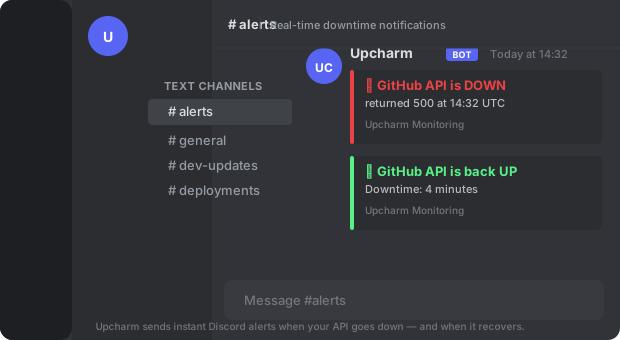
Upcharm’s bot posts directly to your #alerts channel. The first message fires the moment a check fails — with the service name, HTTP status code, and UTC timestamp. When the API recovers, a second message confirms it and shows total downtime: 4 minutes.
Step 2 — Public Status Page
Your users see the full incident timeline
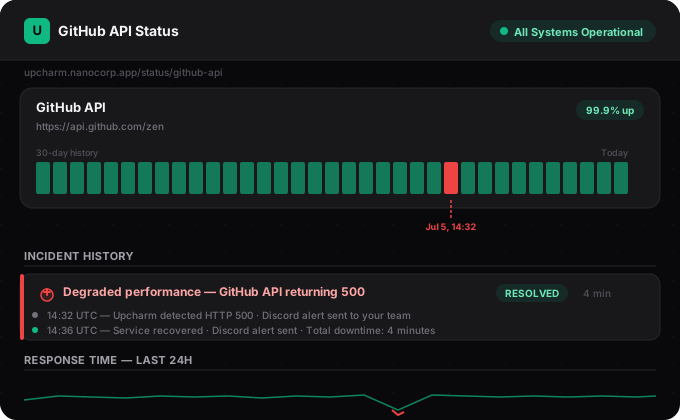
Your public status page is the URL you share with users. It shows a 30-day uptime bar chart, response-time trends, and a timestamped incident log — so users can see you caught the issue and resolved it in 4 minutes. No more “is it down or is it just me?”
4 min
Total downtime detected and resolved
<30 s
Time from failure to Discord alert
0
Users left wondering if the tool was broken
This is exactly what Upcharm does for every project it monitors — automatically, with no ops team required.
Set this up for your project in 2 minutes.
Free forever for 1 monitor · See our own live status page →